
Podcasting is one of the fastest ways to grow an audience, but for many website owners, it feels like one more thing to manage. You need recording gear, editing software, hosting, publishing workflows, and time you probably don’t have.
Here’s the good news: if you already have a blog, you’re sitting on a podcast library in disguise.
Your articles already contain the ideas, stories, tutorials, and expertise people want to hear. The challenge isn’t creating new content from zero; it’s turning the content you already wrote into audio people can listen to on the go.
That’s exactly where WordWave comes in. It helps you transform your WordPress blog into a podcast-ready audio experience directly from your website.
Why Turn Your Blog Into a Podcast?
Not everyone consumes content the same way. Some people love reading long-form posts. Others prefer listening while driving, walking the dog, working out, or doing dishes. By offering audio versions of your content, you can reach people in moments where reading isn’t possible.
Repurposing your blog into a podcast can help you:
- Expand your audience
- Increase time spent with your content
- Improve accessibility
- Build stronger brand connection through voice
- Get more value from content you’ve already published
Instead of asking, “Should I start a podcast?” the better question might be:
How can I turn what I already have into audio quickly and professionally?
The Traditional Way (And Why It Slows People Down)
Normally, launching a podcast means:
- Writing episode scripts
- Recording audio
- Editing mistakes and pauses
- Exporting files
- Uploading episodes
- Managing feeds and distribution
- Repeating the process every week
That workflow works, but it’s heavy. For busy bloggers, creators, agencies, and businesses, it often means the podcast idea stays stuck on the to-do list.
The Smarter Way: Use WordWave
WordWave turns your WordPress site into an audio publishing engine.
Instead of building a separate podcast process, the WordWave audio plugin for WordPress helps you create audio from your existing content and manage podcast functionality right inside WordPress.
That means fewer tools, fewer steps, and less friction.
How It Works
1. Start With Content You Already Published
Choose a blog post that already performs well or answers common customer questions.
Great examples:
- Tutorials
- Opinion pieces
- Case studies
- Industry updates
- Evergreen guides
- FAQs
If it works as an article, it can often work as an audio episode too.
2. Turn It Into Audio
With WordWave, your written content becomes the foundation for audio, so you can publish without needing a microphone, recording booth, or hours in editing software.
3. Publish From WordPress
Because WordWave is built for WordPress, you can manage content and audio in the place you already know. No jumping between multiple platforms.
4. Grow Consistently
Once your workflow is simplified, consistency becomes realistic. And consistency is what grows audiences.
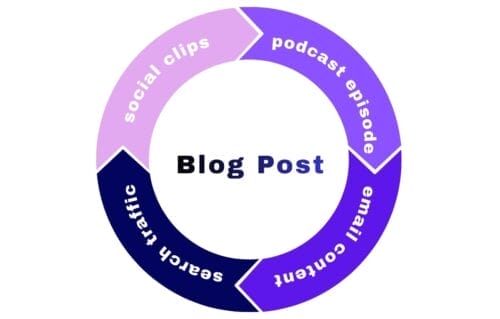
One blog post can become:
- A podcast episode
- Social clips
- Email content
- Newsletter material
- Search traffic + audio traffic
It’s a clever way to leverage your content without creating a ton of extra work.
Who WordWave Is Great For
Bloggers
Turn archives of written posts into fresh audio content.
Businesses
Convert educational content into a more engaging channel for leads and customers.
Agencies
Offer podcast-ready content solutions without adding a huge production workload.
Creators
Publish more often without burning out.
Why This System Works
Most people don’t need more ideas. They just need a simpler system. WordWave removes the gap between “I should start a podcast” and “My episode is live.” Instead of building a second content machine, it lets your blog become one.
Getting Started
If you already run WordPress, you’re closer than you think. Your next podcast episode may already be sitting in your blog archives, waiting to be heard.
Explore WordWave and start turning your blog into audio today. Learn More About WordWave